
How to Set Up and Optimize Wi-Fi Network for Small Business Internet
How to set up a wi-fi network? Before anything else, make sure you have an internet connection in your home. If you don't have yet, order an internet package from a service provider near you. In order for you to have ease getting an internet connection, we have researched a lot of trusted internet provider
How to set up a wi-fi network for small businesses? Before anything else, make sure you have an internet connection in your home. If you don't have yet, order an internet package from a service provider near you.
In order for you to have ease getting an internet connection, we have researched a lot of trusted internet provider based in your area. So make sure to dive into our provider page to learn more. Just enter your zip code and shop for a package that suits your needs.
How to Setup a Wi-Fi Network in Easy Steps
Purchase a modem
Once the internet has been installed, you will need a modem. The modem is a device to connect to web and internet connection from the type of connection such as fiber, cable, DSL, or satellite.
To make an internet connection from your modem to your computer, simply plug in your ethernet cable to be able to communicate with your internet service provider.
Also, Read: Easiest Way to Self-Install Your Spectrum Internet Service
Router
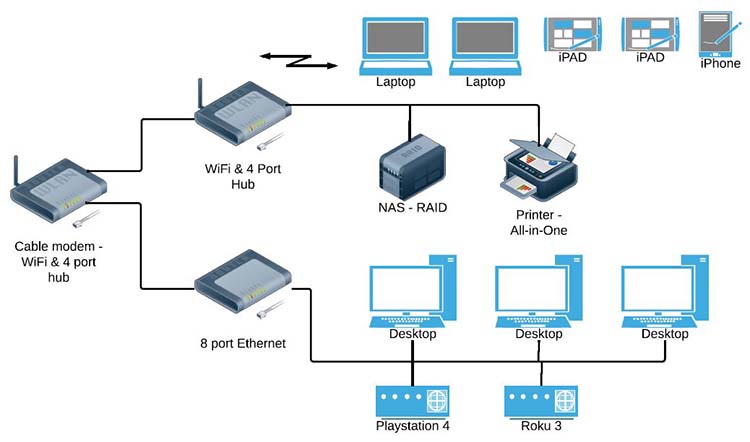
The most modem is only capable of one ethernet-ready device like a computer. In order for you to hook up multiple devices to your internet connection, you need additional equipment which is the router.
The router will broadcast the internet connection from your modem to multiple devices wirelessly called Wi-Fi. This is a very important device to utilize your internet functionality, and most importantly you will be able to share your internet connection with your family members.
Connecting your Wi-Fi
Now that you have an internet connection, modem, and router, it's time to make your home Wi-Fi network ready.
1. Get the internet provider's cable or telephone cord (this depends on ISP)
2. Plug the Ethernet cable provided by the company in both the internet modem and router.
3. Now that you have connected both the internet modem and route, get both device power cords and plug them into your power outlet.
4. Once everything is plug in, switch on both devices, and let them connect to each other for calibration.
Also, Read AT&T Business Internet: Things You Need To Know! Complete Guide
Setting up Wi-Fi Network
If everything is turned on, it's time to set up your Wi-Fi network via web routers web interface.
1. Look at the router bottom and find the IP address and default admins login credentials, or get the router's manual for instructions.
2. After that, open your favorite browser and enter the IP address into the URL address bar. This will open the router's web interface.
3. Most routers will walk you through using the set-up wizard. Fillup all necessary information ask especially changing the Wi-Fi network and password.
After you completed all the steps above your wifi- network is ready to surf the internet, The router will now able to receive internet protocol on the internet and transmit the internet to any device connected to your network.